
Module 1: My Europass documents
3. How to create your own CV and Cover Letter?
3.1. Create CV
Now the fun part! Scrolling down the home page of Europass you will surely stumble upon this nice blue section. Here you have all the relevant buttons to access the Europass documents editor.

After deciding which language among the 29 available languages you want your CV to be in, you can fill in you personal info. Here a small sample of how it will look like. Of course you can decide whether to add a picture of yourself (make sure it is professional) or not.
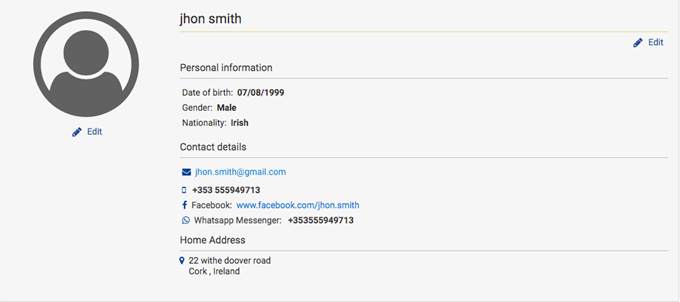
The Europass CV editor offers an inclusive and straight forward template, which is also easy to fill in and interactive. You can even decide whether you what to show your educational background or your work experience first.
The standard template displays the following information:
- personal info;
- job applying for;
- work experience;
- educational background;
- personal skills, divided by:
- mother tongue;
- other languages;
- communication skills;
- organizational/Managerial skills;
- job-related skills;
- digital skills.
Moreover, it is possible to add on other fields, available on the top right corner of the editor page. These are:
- photo;
- other skills;
- driving license;
- additional information;
- attachments.
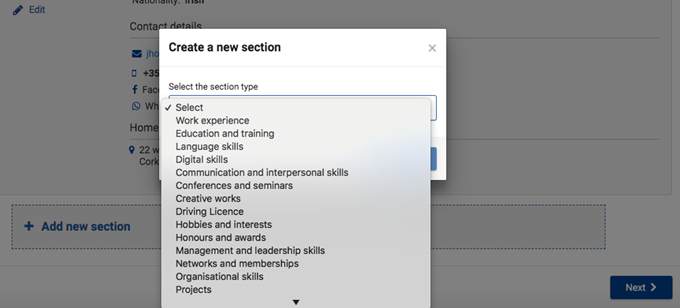
Once you have completed you personal information section you will be able to click on “add new section”. If you do click on it, a pop up window will show up and you will be able to choose which area of your CV you would like to fill in.
Once you have completed you personal information section you will be able to click on “add new section”. If youy do click on it, a pop up window will show up and you will be able to choose which area of your CV you would like to fill in.
Find examples
of Europass CVs in several languages, including Portuguese, Bulgarian, Italian
and Slovenian